
Looking for a working and updated Vector Hub script for Blox Fruits? You’re in the right place. With Blox Fruits being one of the most played games on Roblox, players are constantly searching for reliable scripts to level up faster, farm efficiently, and unlock powerful abilities without wasting countless hours.
Vector Hub stands out as one of the most popular free Blox Fruits scripts, offering premium-like features at zero cost. Unfortunately, the internet is flooded with fake, outdated, or broken scripts that either don’t work or put your Roblox account at risk. That’s why we’ve prepared this updated guide.
In this article, we’ll cover everything you need to know about the latest Vector Hub Blox Fruits script, including what it is, why it’s so popular, and how it helps you exploit Blox Fruits safely and efficiently. Let’s dive in.
What is Vector Hub Updated Script?
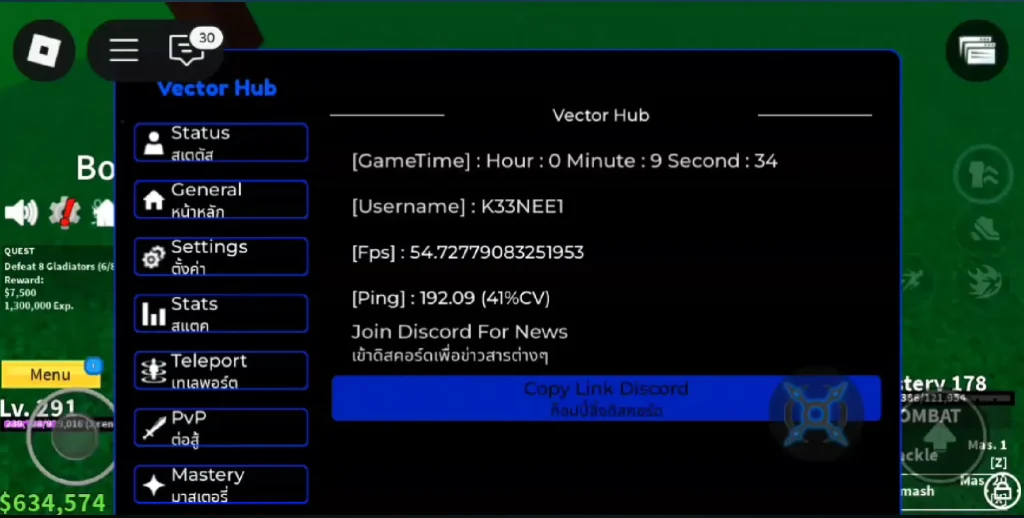
Vector Hub Updated Script is a powerful and feature-rich Roblox script specifically designed for Blox Fruits. It allows players to automate grinding, farming, and exploration tasks that normally take hours of manual effort. Because it’s regularly updated, Vector Hub remains compatible with the latest Blox Fruits patches and Roblox updates.
This script is especially popular because it offers a wide range of free features that are usually locked behind paid hubs. Players can use Vector Hub to auto-farm levels, collect chests, defeat enemies, and move across islands with ease. Whether you’re a beginner trying to level up quickly or an advanced player aiming to maximize efficiency, Vector Hub adapts to your playstyle.
Some of its standout capabilities include Auto Farm Level, Bypass Teleport, Safe Mode, Auto Nearest Farm, and Auto Chest Farm, along with many other customizable options. The script has been tested on both PC and mobile devices, ensuring smooth performance across platforms.
Thanks to its clean English interface, frequent updates, and stable execution, Vector Hub continues to be one of the best all-in-one Blox Fruits scripts available in 2026.
All Vector Hub Scripts Updated (2026)
Blox Fruits Vector Hub
loadstring(game:HttpGet(“https://raw.githubusercontent.com/Tuxoz/VectorHub/main/BloxFruitPC%26MOBILE”))()Vector Hub Blox Fruits Script 2
_G.Mode = "English"
loadstring(game:HttpGet("https://raw.githubusercontent.com/Tuxoz/VectorHub/main/MBPC"))()
Vector Hub Blox Fruits Script 3
loadstring(game:HttpGet("https://raw.githubusercontent.com/Tuxoz/VectorHub/main/BF"))()GHOST Blox Fruits Vector Hub
loadstring(game:HttpGet("https://raw.githubusercontent.com/Tuxoz/VectorHub/main/ez"))() Get Script Blox Fruits 2024 Vector Hub
_G.Mode = "Eng"
loadstring(game:HttpGet("https://raw.githubusercontent.com/AAwful/VectorHub/main/Loader.lua"))()
CYAN HUB V2 & VECTOR HUB V3 Blox fruits Script
loadstring(game:HttpGet("https://raw.githubusercontent.com/Jadelly/VectorHub/main/CyanHub", true))()Vector Hub Blox Fruits Features List
Vector Hub is packed with powerful automation and quality-of-life features that make grinding in Blox Fruits fast and effortless. Below is a complete list of its most popular features:
- Auto Farm Level – Automatically farms enemies to level up your character quickly
- Auto Nearest Farm – Detects and attacks the nearest NPC for efficient grinding
- Auto Farm Quest – Accepts and completes quests automatically
- Auto Farm Chest – Collects chests from different islands for fast Beli farming
- Auto Boss Farm – Automatically defeats bosses for rewards and drops
- Bypass Teleport (TP) – Teleport safely between islands without getting detected
- Safe Mode – Reduces ban risk while auto farming
- Auto Skill / Auto Attack – Uses abilities and attacks automatically during combat
- Fast Attack – Increases attack speed for faster enemy kills
- Auto Haki – Automatically enables and manages Haki
- Weapon & Fruit Auto Equip – Equips the best weapon or fruit automatically
- Devil Fruit Sniper – Helps locate and purchase fruits efficiently
- Stats Auto Allocate – Automatically distributes stat points
- ESP / Player Detection – View enemies, bosses, and players easily
- Smooth & Clean UI – User-friendly English interface
- Mobile & PC Support – Works perfectly on Android, iOS, and Windows
- Regular Updates – Compatible with latest Blox Fruits updates
- Free to Use – No key system or payment required
How To Run Blox Fruits Script Vector Hub Using the Delta Executor?
To run the Vector Hub Scripts on mobile or iOS, Delta Executor is the best choice.
Here’s a simple step-by-step guide to help you install and use the Vector Hub script using Delta Executor:
Step 1. Download the latest version of Delta Executor for your device (iOS, Android, or PC).
Step 2. Install the executor by following the setup guide. For iOS, you may need AltStore or TrollStore. Android users should enable “Install from unknown sources.”
Step 3. Log in to your Roblox account and launch Vector Hub from the game menu.
Step 4. Copy the working Vector Hub scripts from the above-given list. Copy the entire Lua code.
Step 5. Open the Delta dashboard inside Roblox. Paste your copied script into the script editor.
Step 6. Tap on “Execute” to run the script. If it’s working, you’ll see a GUI pop up inside the game with options like Auto Farm Level, Auto Quest, Auto Chest, & more.
You can now explore the dark forest with boosted powers. Use the script to survive longer, collect items, or simply have more fun with friends.