
MacBook users had been requesting a Delta Executor Mac version. Now that the wait is finally over, the Delta Executor macOS has been officially released, allowing MacBook users to download and install it on their devices.
After the release of the Mac version, Delta Executor has become the only scripting tool available on Android, iOS, Windows, and macOS. This makes Delta a complete multi-platform executor for Roblox scripting.
When the developers introduced the Delta iOS Direct Install feature, it quickly became very popular. Due to its success, the developers decided to release Delta Executor for Mac as well. If you don’t know what Delta Direct Install is, it allows you to download and install IPA files without using any sideloading apps.
If you are a MacBook user and want to run scripts in your favorite Roblox games using Delta Executor, then this guide is for you. In this guide, we will show you how to easily install Delta Executor on macOS.
So, let’s start the guide.
Delta Executor MacOS Installation Guide (2026)
Just like Delta iOS Direct Install, MacBook users can install Delta Executor by simply downloading its DMG file. Even though the process is easy, many users still don’t know the correct steps. Follow the guide below carefully.
- First, open your browser and visit the official Delta Executor website: delta-executor.org
- On the homepage, click on the Mac option from the main navigation menu.
- Now scroll down and click the “Install For macOS” button.
- After clicking the button, the delta.dmg file will start downloading.
- Once the download is complete, open the DMG file.
- The Delta Installer window will appear on your screen.
- Drag the Delta Installer icon into the Applications folder.
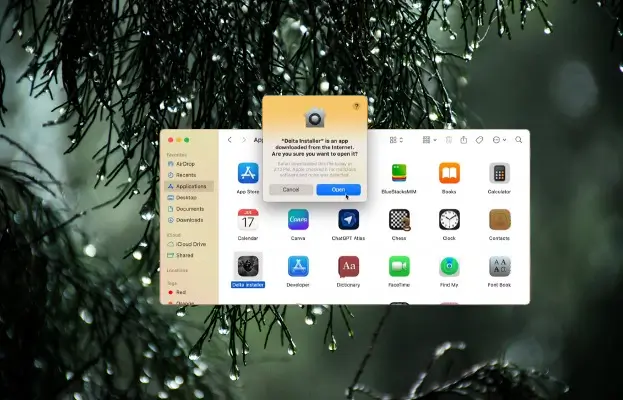
- After that, open the Applications folder on your Mac.
- Find Delta Installer and click on it.
A popup message will appear saying:
“Delta Installer is an app downloaded from the internet. Are you sure you want to open it?”
Click Open.
The Delta Installer window will now open. Click on the “Install Delta” button.
Delta Executor will start downloading and installing on your MacBook.
Once the installation is complete, launch Delta Executor and start running scripts in your favorite Roblox games.
That’s it! Delta Executor is now successfully installed on your MacBook.