
Infinite Yield Script is one of the most popular and trusted admin command scripts in the Roblox community. It allows players to enhance gameplay by unlocking powerful commands that improve movement, speed, control, and overall performance. Whether you play on mobile or PC, Infinite Yield works smoothly with a simple user interface and fast execution, making it suitable for both beginners and advanced Roblox players.
With the Infinite Yield script, users can access hundreds of built-in admin commands that completely change how Roblox games are played. These commands let you teleport across maps, adjust walk speed, modify jump power, control weather, customize characters, enable ESP, and much more. The script is highly customizable, allowing players to add new features and tailor commands to fit different Roblox games without affecting stability.
In this article, we have provided tested working Infinite Yield Script. These are universal Roblox script so you can use it in any Roblox executor like Delta Executor.
What is Infinite Yield Loadstring?
Infinite Yield Loadstring is a simple code used to run the Infinite Yield admin command script in Roblox through an executor. By pasting the loadstring, players can instantly access hundreds of commands on PC and Android without downloading extra files or using complex setups.
It allows players to control movement, speed, teleportation, and many other game features with smooth and safe execution. Infinite Yield Loadstring works across most Roblox games and helps users customize gameplay, complete tasks faster, and enjoy a more powerful and flexible gaming experience.
Infinite Yield Script 2026 – Latest Working
Admin Script (Infinite Yield)
loadstring(game:HttpGet('https://raw.githubusercontent.com/EdgeIY/infiniteyield/master/source'))()Infinite Yield WeAreDevs
loadstring(game:HttpGet("https://obj.wearedevs.net/2/scripts/Infinite%20Yield.lua"))()Best Infinite Yield Command Line Script
loadstring(game:HttpGet("https://raw.githubusercontent.com/EdgeIY/infiniteyield/master/source"))()Official Infinite Yield Script 2026 loadstring
loadstring(game:HttpGet('https://raw.githubusercontent.com/DarkNetworks/Infinite-Yield/main/latest.lua'))()How To Run Infinite Yield Script Mobile 2026 Using Delta Executor?
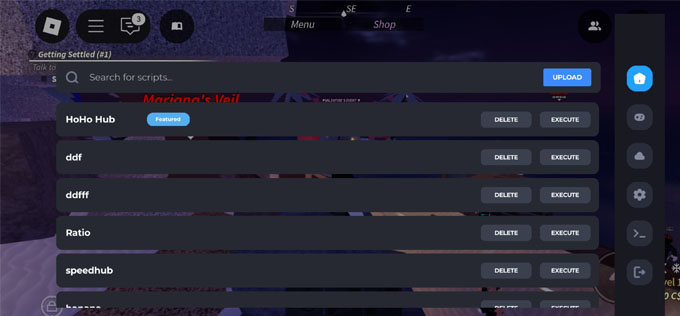
To run the Infinite Yield Script on mobile or iOS, Delta Executor is the best choice.
Here’s a simple step-by-step guide to help you install and use Infinite Yield script using Delta Executor:
Step 1. Download the latest version of Delta Executor for your device (iOS, Android, or PC).
Step 2. Install the executor by following the setup guide. For iOS, you may need AltStore or TrollStore. Android users should enable “Install from unknown sources.”
Step 3. Log in to your Roblox account and launch Infinite Yield from the game menu.
Step 4. Copy a working Infinite Yield script from the above-given list. Copy the entire Lua code.
Step 5. Open the Delta dashboard inside Roblox. Paste your copied script into the script editor.
Step 6. Tap on “Execute” to run the script. If it’s working, you’ll see a GUI pop up inside the game with options like WalkSpeed, ESP, No Jumpscare, or Auto Run.
You can now explore the dark forest with boosted powers. Use the script to survive longer, collect items, or simply have more fun with friends.