
CodeX Executor is considered a reliable alternative to Delta Executor. CodeX is available to download for Windows PCs, allowing you to execute any script with ease.
CodeX not only enhances your gaming experience, but it also helps you automate simple tasks and unlock cool new features.
Codex developers make sure that your scripting experience never halts thanks to their regular updates.
If you are new to CodeX, then here we have briefly explained how you can download, install, and use CodeX on your Windows PC.
What is CodeX Executor?
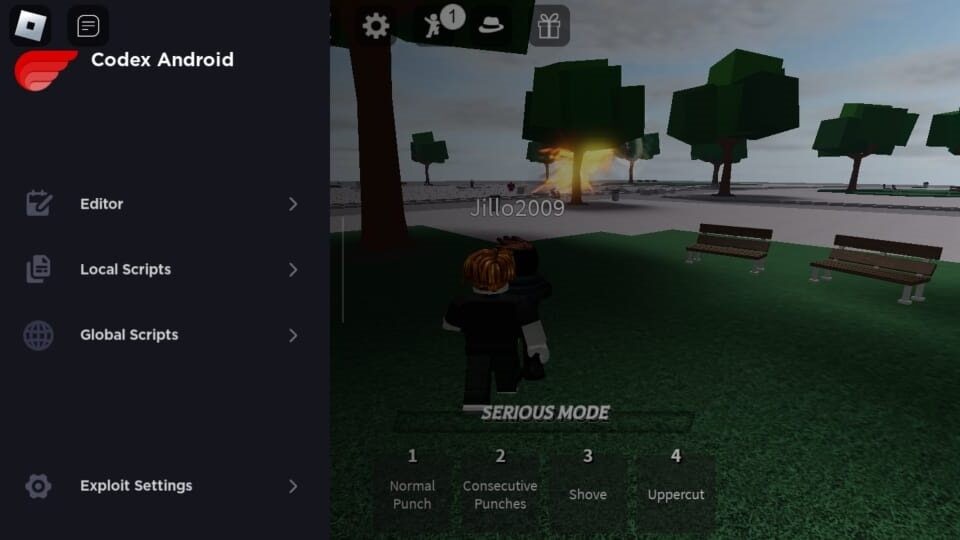
CodeX Executor is a Lua script executor that runs complex Roblox scripts smoothly without affecting performance. CodeX is designed for low-end PC devices, so users avoid lag, crashes, and loading issues.
This Roblox executor has an exclusive script hub where you can search for any popular game, such as Grow a Garden, Steal a Brainrot, 99 Night in the Forest, Brookhaven, Blox Fruit, and Fisch, and run scripts instantly.
Developers do understand the need to run popular external script hubs, so they have added support for HoHo Hub, Neva Hub, Speed X Hub, RedZ Hub, and Limit Hub.
CodeX has a team of experienced developers who regularly release updated versions, making it compatible with Roblox updates.
Unlike Delta APK and Delta iOS, which quickly update upon each new Roblox update, CodeX is not fast enough.
Download CodeX Executor v0.748.0.7481526 for Windows
| Name | Codex Executor |
| Supporting OS | Windows 10 & 11 OS |
| File Size APK & iOS | 65 MB |
| App Version | v0.748.0.7481526 |
| File type | .exe |
| Architecture | 64-bit |
| Developer | Furky |
| New Update | November 24, 2026 |
How to Download CodeX Executor on Windows PC?
Downloading CodeX Executor is simple; just follow the step-by-step guide below to download CodeX Executor:
Step 1: Download the installer using the button above.
Step 2: If your browser blocks it, open Downloads, click ‘Show all’ and choose ‘Allow dangerous file’ – it’s a false positive.
Step 3: Open Codex and wait for it to load.
Step 4: Launch Roblox, attach, and execute your first script.
Now, you’re ready to enjoy the features and capabilities of CodeX Executor on your device.
How to Get CodeX Executor Key?
To unlock the full potential of CodeX Executor, you’ll need to obtain a key. The process is similar to the Delta Android Keysystem.
Follow these steps to get the key:
Step 1: Launch CodeX on your device and play any Roblox game.
Step 2: Wait till CodeX UI appears; here you will see the Get Key button or whitelisted. Click it to copy the URL
Step 3: Paste the URL in the browser, and you will be redirected to the Lootlabs or Linkvertise website.
Step 4: Here, you will need to complete simple tasks.
Step 5: Once you complete the tasks, you will get the CodeX key.
Step 6: Copy and paste the key into the main Window, and you are good to go.
How to Join the CodeX Discord Server?
You can join the official CodeX Discord server using this link: https://discord.com/invite/codexlol. Here developer announces the latest updates about the developments and versions.
If you are facing crashing, lagging, or loading issues, you can contact their support via this server. So you want to join the Delta Discord server for support or want to check the server status, follow the links.
CodeX Alternatives Executor
If CodeX isn’t working, consider these alternatives:
- Cryptic Executor
- Krnl Executor
- Arceus X NEO
- Illusion Executor
- Ronix Executor
- Fluxus Executor
- Vega X Executor
- Trigon Executor
Codex Android Update – Changelog
- Updated to the latest version of Roblox
- FIXED ALL ISSUES