Looking for a working and versatile Roblox script hub that supports multiple games in 2026? Foggy Hub Script has become one of the most talked-about script collections among Roblox exploit users.
Unlike single-game scripts, Foggy Hub works across a number of popular games making it a go-to choice for players who want enhanced abilities like ESP (seeing players/items through walls), teleportation tools, fling features, auto-coin farming, and more. These powerful features help users automate progression, gain competitive advantages, and explore game mechanics more freely.
Below, we explain what the Foggy Hub script is and why many Roblox players look for it online.
What is Foggy Hub Script?
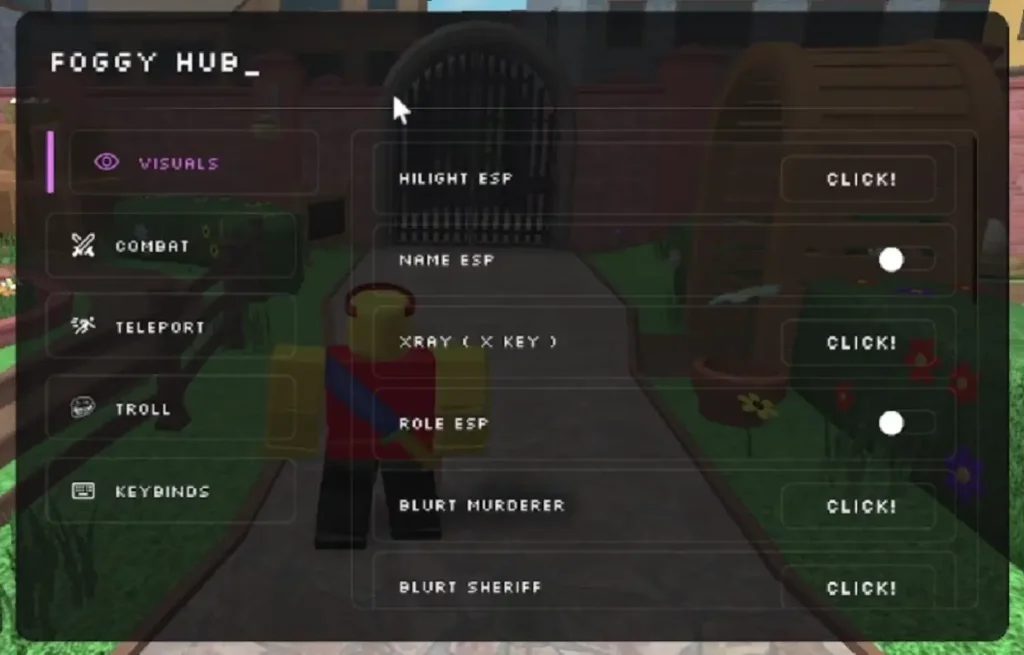
Foggy Hub Script is a universal Roblox script hub designed to work with multiple games by providing a collection of automation features in one place. Depending on the game you load it in, Foggy Hub’s scripts can unlock things like ESP (Player & Item Tracking), Teleportation functions, Fling All features, coin or XP farming, kill/attack modifiers, and game-specific enhancements all accessible through a single interface. It has been made available for games such as Murder Mystery 2, Arsenal, Built a Boat, Tower of Hell, Legends of Speed, Fisch, Broken Bones 4, Blox Fruits, Blade Ball, Rivals, Dead Rails, and more, with users reporting regular updates and broad compatibility.
The hub often uses a loadstring execution method meaning you paste its code into Delta executor to run it in Roblox and may require joining a Discord group or retrieving a key for certain versions. The scripts in Foggy Hub typically include a wide range of game-specific and universal features that simplify grinding, enhance visibility, and provide movement or combat advantages in supported games.
Foggy Hub Script Features
- esp
- xray
- kill all
- shoot murder
- shoot murder safe
- kill sheriff
- grab gun
- teleport to lobby
- teleport to map
- teleport to murderer
- teleport to sheriff
- teleport to random player
- coin farm(2 features)
- fling player
- fling all
- fling murderer
- fling sheriff
- anti fling
All Foggy Hub Script Working
FoggyHub | Hub for 15 Games
script loaader : loadstring(game:HttpGet("https://raw.githubusercontent.com/FOGOTY/foggy-loader/refs/heads/main/loader"))()FoggyHub MM2
loadstring(game:HttpGet("https://raw.githubusercontent.com/FOGOTY/mm2-foggy/main/script"))()FoggyHub 13 games
loadstring(game:HttpGet("https://raw.githubusercontent.com/FOGOTY/foggy-bloxfruit/refs/heads/main/script"))()FoggyHub PVB
loadstring(game:HttpGet("https://raw.githubusercontent.com/FOGOTY/plants-vs-brainrots/refs/heads/main/script"))()Foggy Hub Supported Games:
- MM2
- Built A Boat
- Arsenal
- Tower Of Hell
- Legends Of Speed
- Elementary Poweer Tycoon
- Fisch
- Obby On a bike
- Broken Bones 4
- Blox Fruits
- Blade Ball
- Rivals
- Dead Rails
- Slap Battles
- Brookhaven
- 99 Nights In The Forest
How to Run Foggy Hub Script Using Delta Executor
With Delta Executor, you can run the script safely on iOS, Android, and Windows. It’s one of the most trusted keyless script executors available today.
Here’s a simple step-by-step guide to help you install and use the Foggy Hub using Delta Executor:
Step 1. Download the latest version of Delta Executor for your device (iOS, Android, or PC).
Step 2. Install the executor by following the setup guide. For iOS, you may need AltStore or TrollStore. Android users should enable “Install from unknown sources.”
Step 3. Log in to your Roblox account and launch Foggy Hub from the game menu.
Step 4. Copy a working Foggy Hub script from the above-given list. Copy the entire Lua code.
Step 5. Open the Delta dashboard inside Roblox. Paste your copied script into the script editor.
Step 6. Tap on “Execute” to run the script. If it’s working, you’ll see a GUI pop up inside the game with options like WalkSpeed, ESP, No Jumpscare, or Auto Run.
You can now explore the dark forest with boosted powers. Use the script to survive longer, collect items, or simply have more fun with friends.